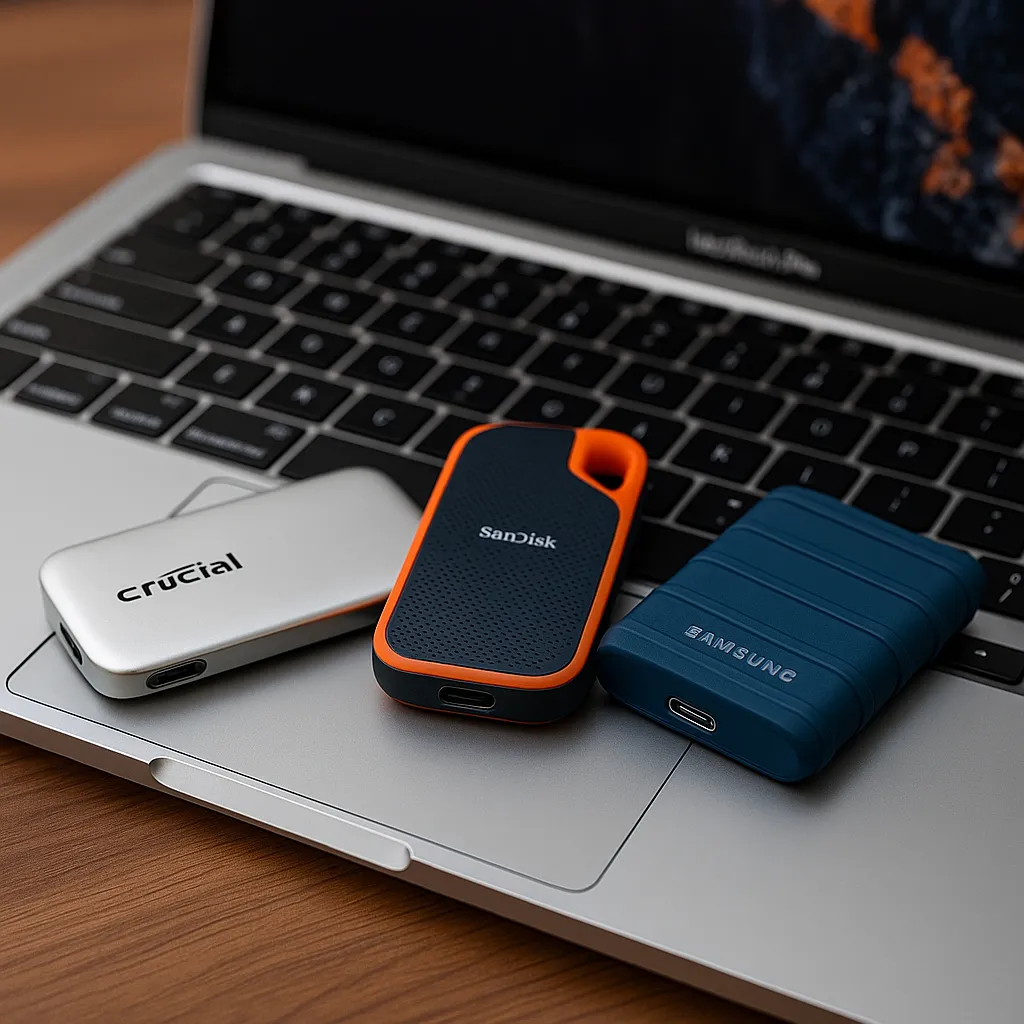
Best 2TB SSD External Hard Drive for Mac: 3 Top Picks
Disclosure: This post contains affiliate links. LaptopVoyager.com participates in the Amazon Associates Program and may earn commissions on qualifying purchases, at no extra cost to you.
Last Updated: October 2026
A 2TB external SSD can add substantial storage to a MacBook without requiring an internal upgrade. It can provide additional room for photos, videos, backups, creative projects, and other large files while remaining compact enough for travel.
This guide compares three 2TB portable SSDs based on manufacturer specifications, transfer speeds, Mac compatibility, portability, and durability.
👉 For a broader comparison of external storage technologies, see SSD vs HDD External Hard Drives.
💰 Check Price & Availability
View on Amazon – Crucial X9 Pro 2TB (up to 1,050MB/s, USB-C, IP55)
View on Amazon – SanDisk Extreme 2TB (up to 1,050MB/s, USB-C, IP65)
View on Amazon – Samsung T7 Shield 2TB (up to 1,050MB/s, USB-C, IP65)
📋 Quick-View Comparison List
Best Compact Option: Crucial X9 Pro 2TB
Best Lightweight Option: SanDisk Extreme 2TB
Best Rugged Option: Samsung T7 Shield 2TB
🔍 What Makes a Good 2TB External SSD for Mac?
Transfer speed, connectivity, physical size, durability, and macOS compatibility are important considerations when choosing portable storage for a Mac.
All three SSDs in this comparison provide 2TB of storage, use USB-C connectivity, and have manufacturer-specified read speeds up to 1,050MB/s. These specifications make them suitable for transferring large files, maintaining media libraries, storing backups, and accessing files from external storage.
A 2TB capacity also provides a useful middle ground for portable storage. It offers considerably more space than smaller-capacity drives while maintaining the compact dimensions associated with portable SSDs.
📦 Crucial X9 Pro 2TB – Best Compact Option
The Crucial X9 Pro combines compact dimensions with transfer performance designed for portable-storage workloads.
Crucial specifies sequential read speeds up to 1,050MB/s and sustained write performance up to 975MB/s. The drive connects through USB-C and supports Mac computers along with several other platforms.
The X9 Pro measures approximately 65 × 50 mm. Its anodized aluminum construction and rubberized base are designed to provide a durable but lightweight enclosure.
Crucial also specifies IP55 water and dust resistance and drop protection from heights up to two meters.
For Mac users, the X9 Pro supports Apple’s FileVault encryption. The drive ships in exFAT format and can be reformatted when a different file system is required.
Its combination of 2TB capacity, compact dimensions, USB-C connectivity, and up to 1,050MB/s specified read performance makes it suitable for users who prioritize a small portable SSD.
📦 SanDisk Extreme 2TB – Best Lightweight Option
The SanDisk Extreme Portable SSD combines 2TB of solid-state storage with a compact enclosure designed for portable use.
SanDisk specifies read speeds up to 1,050MB/s and write speeds up to 1,000MB/s for this generation of the Extreme Portable SSD. It uses a USB 3.2 Gen 2 interface with USB-C connectivity.
The enclosure measures approximately 100.5 × 52.4 × 9 mm, allowing it to fit easily into a laptop bag or small accessory compartment.
SanDisk also specifies IP65 water and dust resistance. This provides additional environmental protection when the drive is carried between locations.
An integrated loop provides another option for securing or attaching the drive while traveling.
For Mac users who prioritize low weight and compact dimensions, the SanDisk Extreme combines 2TB capacity with up to 1,050MB/s specified read performance.
📦 Samsung T7 Shield 2TB – Best Rugged Option
The Samsung T7 Shield combines portable SSD storage with an enclosure designed for additional physical protection.
Samsung specifies sequential read speeds up to 1,050MB/s and write speeds up to 1,000MB/s through its USB 3.2 Gen 2 interface.
The 2TB model measures approximately 59 × 88 × 13 mm and weighs around 98 grams. Its rubberized exterior is designed to improve grip while protecting the SSD enclosure.
Samsung specifies an IP65 rating for water and dust resistance and drop resistance from heights up to three meters under its stated testing conditions.
The T7 Shield also supports AES 256-bit hardware encryption through Samsung’s supported software.
Samsung lists compatibility with Mac computers, Windows PCs, Android devices, gaming consoles, and other supported hardware.
Based on these durability specifications, the T7 Shield is designed for users who frequently carry their external storage between locations or use it away from a permanent desk setup.
🔍 Crucial X9 Pro vs SanDisk Extreme vs Samsung T7 Shield
All three drives provide 2TB capacity, USB-C connectivity, and manufacturer-specified read speeds up to 1,050MB/s. Their main differences are therefore found in physical design, protection ratings, dimensions, software features, and specified write performance.
The Crucial X9 Pro emphasizes compact dimensions and provides IP55 protection with specified drop resistance up to two meters.
The SanDisk Extreme combines up to 1,050MB/s read and 1,000MB/s write speeds with an IP65-rated portable enclosure and integrated carrying loop.
The Samsung T7 Shield also provides up to 1,050MB/s read and 1,000MB/s write speeds, while adding an IP65 rating and specified drop resistance up to three meters.
Since their maximum advertised read speeds are similar, portability, durability features, software support, and current pricing can help distinguish between them.
🔍 Is 2TB Enough Storage for a Mac?
For many MacBook users, 2TB provides substantial additional storage.
It can accommodate photo collections, video files, documents, music libraries, project folders, and backups without immediately requiring a larger external drive.
Users working extensively with high-resolution video or maintaining very large media libraries may eventually require more than 2TB. In those situations, a larger SSD or higher-capacity HDD can provide additional archive space.
The appropriate capacity ultimately depends on the amount of data you currently store and how quickly your storage requirements are growing.
🔍 Using a 2TB SSD for Photos and Video
Portable SSDs can be useful for photo and video storage because they combine relatively high transfer speeds with compact dimensions.
All three drives have manufacturer-specified read speeds up to 1,050MB/s. The SanDisk Extreme and Samsung T7 Shield also have specified write speeds up to 1,000MB/s, while Crucial specifies sustained write performance up to 975MB/s for the X9 Pro.
Higher transfer speeds allow large files to be moved more quickly when the computer, connection, cable, and workload can support those speeds.
Users who regularly work with large video or photo files may therefore benefit from the transfer performance provided by these portable SSDs.
If video storage is your main priority, see our Best External Hard Drive for Video Storage guide for additional SSD and HDD options.
🔍 Using a 2TB SSD for Mac Backups
An external SSD can also provide additional capacity for a Mac backup strategy.
A 2TB drive provides enough space for backups from many MacBook configurations, although the appropriate capacity depends on the amount of data stored internally and how much backup history you want to retain.
Mac users planning to dedicate a drive to Time Machine should check Apple’s current formatting and setup requirements before configuring the SSD.
If the external drive will primarily store backups rather than frequently accessed files, a larger-capacity HDD may provide more storage per dollar.
🔍 SSD vs HDD for Mac Storage
An SSD and HDD serve similar storage purposes but use different technologies.
SSDs contain no moving mechanical components and generally provide higher transfer speeds than conventional portable HDDs. Their compact dimensions also make them well suited to portable storage.
HDDs use spinning disks and mechanical read/write components. They generally prioritize capacity and lower cost per gigabyte rather than maximum transfer performance.
For active files that are frequently transferred or accessed, an SSD may be the more suitable format. For large backups and archives where transfer speed is less important, an HDD can provide a capacity-focused alternative.
🔍 Portability and Durability
One advantage of an external SSD over a conventional portable HDD is the lack of moving mechanical components.
That makes SSDs suitable for portable use, although enclosure protection differs between models.
The Crucial X9 Pro has an IP55 rating and specified drop protection up to two meters. The SanDisk Extreme and Samsung T7 Shield both carry IP65 ratings, while Samsung specifies drop resistance up to three meters for the T7 Shield.
These ratings describe protection under specific manufacturer testing conditions and do not make a drive immune to damage. Important files should still be maintained in more than one location.
🔍 Mac Compatibility and USB-C Connectivity
All three drives use USB-C connectivity and are designed for compatibility with Mac systems.
The Crucial X9 Pro, SanDisk Extreme, and Samsung T7 Shield connect through USB interfaces supported by compatible modern Mac computers. Depending on the drive’s factory formatting and intended use, reformatting may be required.
USB-C refers to the physical connector rather than the transfer speed itself. Actual performance depends on the SSD, USB standard, Mac model, cable, files being transferred, and workload.
Before purchasing an external SSD, check the ports and supported interface speeds of your specific Mac model.
🔍 Which 2TB External SSD Should You Choose for Mac?
Choose the Crucial X9 Pro if compact dimensions are a priority. Based on manufacturer specifications, it provides up to 1,050MB/s read performance, up to 975MB/s sustained write performance, IP55 protection, and specified drop resistance up to two meters.
Choose the SanDisk Extreme if you want a lightweight portable SSD with an IP65-rated enclosure. SanDisk specifies up to 1,050MB/s read and 1,000MB/s write speeds.
Choose the Samsung T7 Shield if rugged protection is the main consideration. Samsung specifies up to 1,050MB/s read and 1,000MB/s write speeds, IP65 protection, and drop resistance up to three meters under its stated testing conditions.
All three provide 2TB capacity and USB-C connectivity, so the final choice can be based on dimensions, durability specifications, software features, and current pricing.
📌 Key Takeaways
- All three SSDs provide 2TB of portable solid-state storage.
- All three have manufacturer-specified read speeds up to 1,050MB/s.
- Crucial specifies sustained write performance up to 975MB/s for the X9 Pro.
- SanDisk and Samsung specify write speeds up to 1,000MB/s for the models compared.
- Crucial X9 Pro carries an IP55 rating.
- SanDisk Extreme and Samsung T7 Shield carry IP65 ratings.
- Samsung specifies drop resistance up to three meters for the T7 Shield.
- USB-C connectivity makes the drives compatible with supported modern Mac systems.
- Important data should be maintained in more than one backup location.
🟢 FAQs
Q: What is the best 2TB SSD external hard drive for Mac?
The best option depends on the specifications that matter most to you. Crucial X9 Pro emphasizes compact dimensions, SanDisk Extreme combines lightweight portability with an IP65-rated enclosure, and Samsung T7 Shield emphasizes rugged protection.
Q: Is 2TB enough external storage for a MacBook?
For many users, 2TB provides substantial additional capacity for photos, videos, documents, project files, and backups. Users maintaining very large video libraries or extensive archives may require additional storage.
Q: Can I use these external SSDs with a MacBook?
Yes. All three use USB-C connectivity and are designed for compatibility with Mac systems. Formatting requirements can vary depending on the drive’s configuration and how you plan to use it.
Q: Can a 2TB external SSD be used with Time Machine?
Compatible external SSDs can be configured for Time Machine. Apple’s current formatting and setup requirements should be checked before dedicating a drive to backups.
Q: Should I use an external SSD with my Mac?
An external SSD provides additional storage capacity and relatively high transfer speeds without requiring an internal storage upgrade. Whether it is appropriate depends on your Mac model, available ports, storage requirements, and intended workload.
Q: Is an SSD or HDD better for Mac storage?
An SSD generally provides higher transfer speeds, smaller dimensions, and no moving mechanical components. An HDD generally provides more capacity for the money and can be suitable for large backups and archives.
Q: Which of these SSDs has the strongest specified drop protection?
Based on manufacturer specifications, the Samsung T7 Shield has specified drop resistance up to three meters. Crucial specifies drop resistance up to two meters for the X9 Pro, while protection specifications vary by SanDisk Extreme model generation.
✅ Conclusion
The best 2TB SSD external hard drive for Mac depends on the specifications most relevant to your storage needs. The Crucial X9 Pro combines compact dimensions with up to 1,050MB/s read performance, the SanDisk Extreme provides similar read performance in an IP65-rated portable design, and the Samsung T7 Shield combines up to 1,050MB/s read speeds with IP65 protection and specified drop resistance up to three meters. Since all three provide 2TB capacity and USB-C connectivity, differences in physical design, durability specifications, software features, and current pricing can help determine which option better fits your Mac setup.