USB-C vs Barrel Charger – Which Laptop Charging Type Is Better?
Disclosure: This post contains affiliate links. LaptopVoyager.com participates in the Amazon Associates Program and may earn commissions on qualifying purchases, at no extra cost to you.
Last Updated: March 2026
Laptop charging technology has changed significantly as manufacturers move toward more universal connectors. While traditional barrel chargers are still widely used, many modern laptops now support USB-C charging with Power Delivery.
Understanding the difference between these two charging types helps users choose compatible chargers and avoid common charging problems.
👉 For a broader overview of laptop charging, adapters, and battery care, see the laptop charging guide.
🔍 What Is a Barrel Laptop Charger?
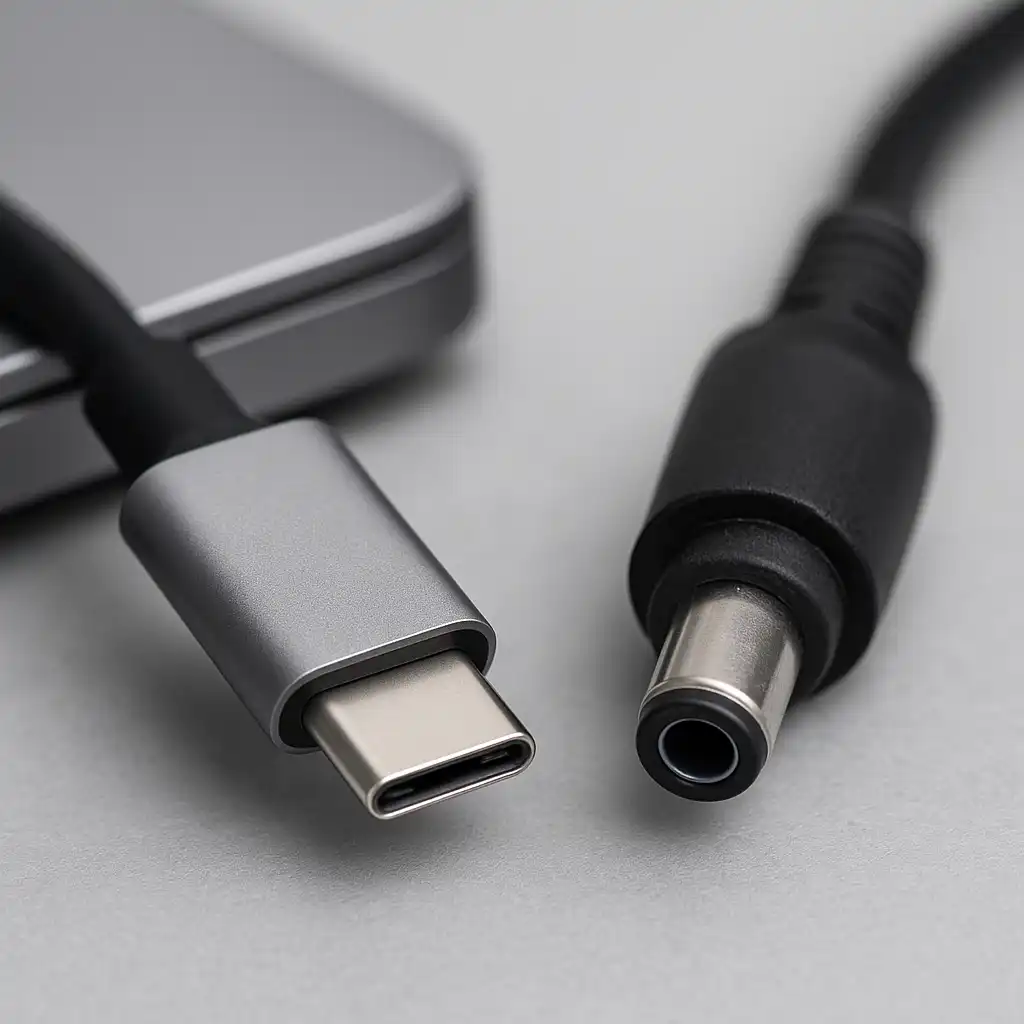
A barrel charger is the traditional laptop charging connector used on many laptops for years. The plug is a round connector designed specifically for a laptop model or brand.
According to manufacturer specifications, barrel chargers typically deliver fixed voltage and wattage levels designed for the device.
This type of charger is still common on:
- gaming laptops
- workstation laptops
- older laptop models
Because barrel connectors are device-specific, replacement chargers must match the laptop’s power requirements and connector type.
🔍 What Is USB-C Laptop Charging?
USB-C charging uses a USB-C connector combined with USB Power Delivery (USB-PD). This technology allows the charger and laptop to negotiate the correct power level.
According to manufacturer documentation, USB-C Power Delivery can supply up to 100W or more, depending on the charger and device.
USB-C chargers can often power multiple device types, including laptops, tablets, and phones.
If you’re exploring compatible adapters, this guide on best universal laptop chargers explains how multi-device chargers work across different laptops.
🔍 Compatibility Differences
One of the biggest differences between these charging methods is compatibility.
Barrel chargers are typically designed for specific laptop models. A charger that works with one device may not fit or provide the correct voltage for another.
USB-C chargers follow a more universal standard when devices support Power Delivery. However, the charger must still provide enough wattage for the laptop to charge properly.
Understanding charger power ratings can help prevent compatibility issues. This guide on can you use a higher wattage charger explains how charger power levels affect laptops.
🔍 Power Delivery and Charging Speed
USB-C charging allows dynamic power negotiation through the USB-PD protocol.
This means the laptop and charger can automatically adjust voltage and current depending on device requirements.
Barrel chargers usually deliver fixed power output, which is specifically designed for the laptop model.
Both systems can provide reliable charging when used with compatible devices.
🔍 Why Some Laptops Still Use Barrel Chargers
Despite the growth of USB-C charging, many laptops still rely on barrel connectors.
High-performance laptops, including gaming systems and mobile workstations, often require higher wattage levels that may exceed the capabilities of some USB-C chargers.
Manufacturers may also prefer dedicated connectors for durability and stable high-power delivery.
📌 Key Takeaways
- Barrel chargers use device-specific round connectors designed for particular laptops.
- USB-C chargers use Power Delivery standards to negotiate charging power.
- USB-C chargers often support multiple devices with one adapter.
- High-power laptops may still rely on dedicated barrel chargers.
🟢 FAQs
Q: Is USB-C charging better than barrel chargers?
Neither option is universally better. USB-C offers broader compatibility, while barrel chargers are often used for higher-power laptops.
Q: Can USB-C replace a barrel charger?
Only if the laptop supports USB-C charging and the charger provides sufficient wattage according to manufacturer specifications.
Q: Why do gaming laptops still use barrel chargers?
Many gaming laptops require higher wattage levels that may be easier to deliver through dedicated charging connectors.
✅ Conclusion
USB-C and barrel chargers represent two different approaches to laptop power delivery. USB-C charging focuses on universal compatibility, while barrel connectors remain common for laptops requiring dedicated high-power adapters.
Understanding the differences between these charging systems helps ensure compatible chargers and reliable laptop charging.